How to Choose Web Hosting: 7 Things That Actually Matter (2026)
In this guide
Quick answer
If you’re starting a blog, portfolio, or small business site, buy an entry-level shared hosting plan from a provider with fast support, honest renewal pricing, and a free domain for year one. Expect to pay $3-5/month at signup and $8-12/month on renewal. Skip the upsells, check the renewal price before you pay, and don’t buy “unlimited” anything without reading the fine print.
I’ve been building websites for clients for about ten years now, and picking hosting is one of the first decisions on every project. This guide is the checklist that experience produced.
Most “how to choose hosting” articles are written to push whichever host pays the highest commission. This one isn’t. It’s the checklist I use when a client asks where to put their site, and it’s the same checklist every review on this blog will follow.
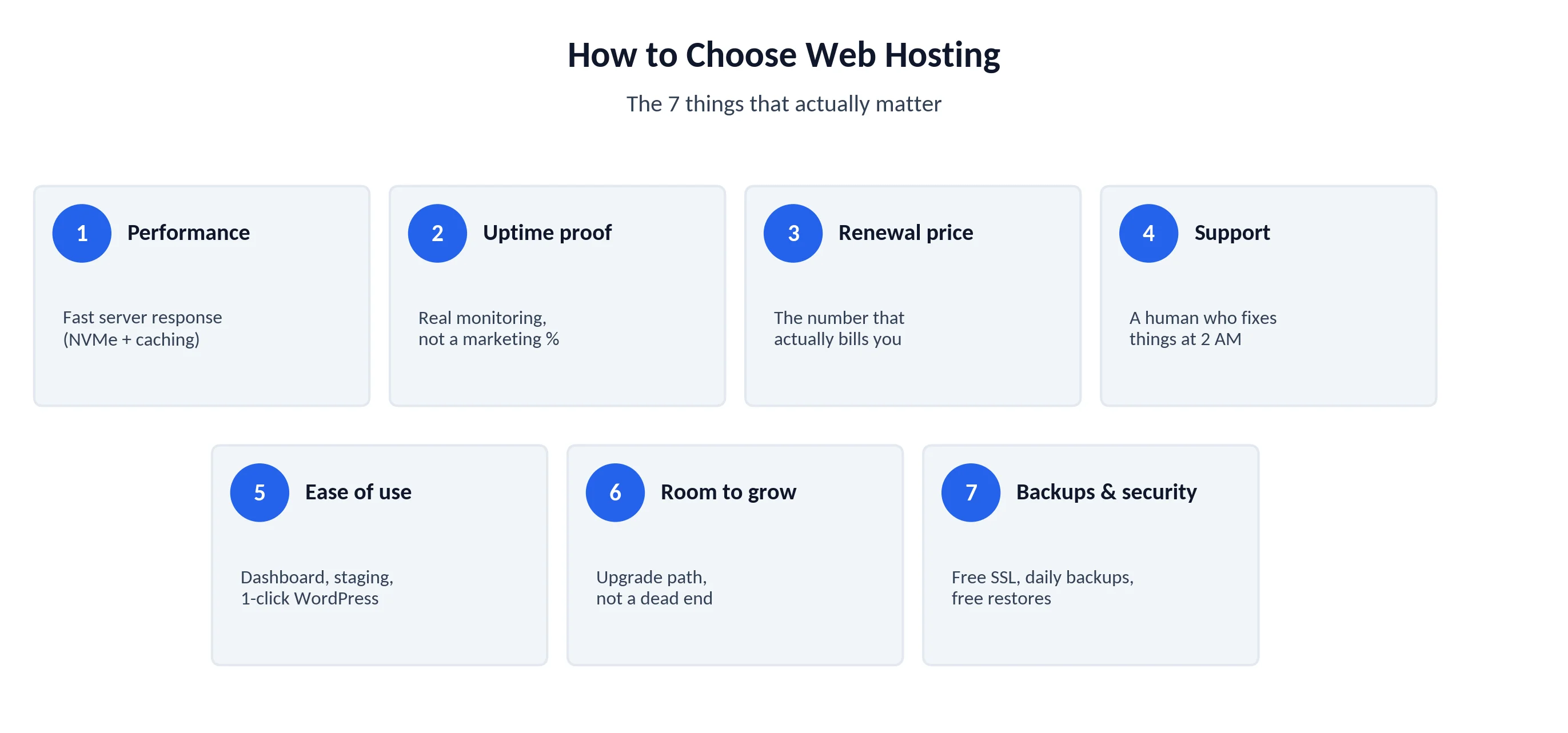
Here are the only seven things that really matter.
1. Performance (and no, “unlimited SSD” tells you nothing)
Your host’s job is to answer requests fast. That’s it. Everything else is decoration.
The metric to care about is server response time (you’ll see it as TTFB - time to first byte). Under ~600ms is fine for a small site. Under 300ms is good. Over a second and your visitors feel it, and so does your Google ranking through Core Web Vitals.
What actually moves the needle:
- NVMe storage over old SATA SSDs. It genuinely matters on busy sites.
- Server-level caching (LiteSpeed, NGINX caching) beats piling caching plugins onto a slow server.
- Data center location close to your audience. If your readers are in the US, your server should be too.
Ignore “unlimited storage” and “unlimited bandwidth.” On shared hosting, both are capped by invisible CPU and memory limits in the terms of service. A host can throttle a 5-page site on an “unlimited” plan the moment it gets a traffic spike.
Tip
Free speed check: after you sign up, run your own fresh site through PageSpeed Insights or GTmetrix - server response time shows in the first waterfall row. If the numbers disappoint, use the refund window.
2. Uptime: what 99.9% actually means
Every host claims 99.9% uptime. Almost none of them publish proof.
Do the math. 99.9% uptime still allows about 43 minutes of downtime per month. 99.99% allows about 4 minutes. For a hobby blog, 99.9% is fine. For a store taking orders, those 43 minutes will find your busiest hour - that’s just how the universe works.
What to look for instead of the marketing number:
- A status page with real incident history, not a green dot.
- An uptime guarantee with credits in the SLA. If they won’t pay when they go down, the number is decoration.
- Third-party monitoring. Reviews on this site will run every host on an uptime monitor for at least 30 days before publishing, with the data shown.
3. The renewal price (where they get you)
This is the one that burns almost everyone once.
That $2.99/month price on the homepage is an introductory rate. It applies to your first term only, and it usually requires paying 12-48 months upfront. When the term ends, the plan renews at the “regular” rate - commonly 2-4x higher.
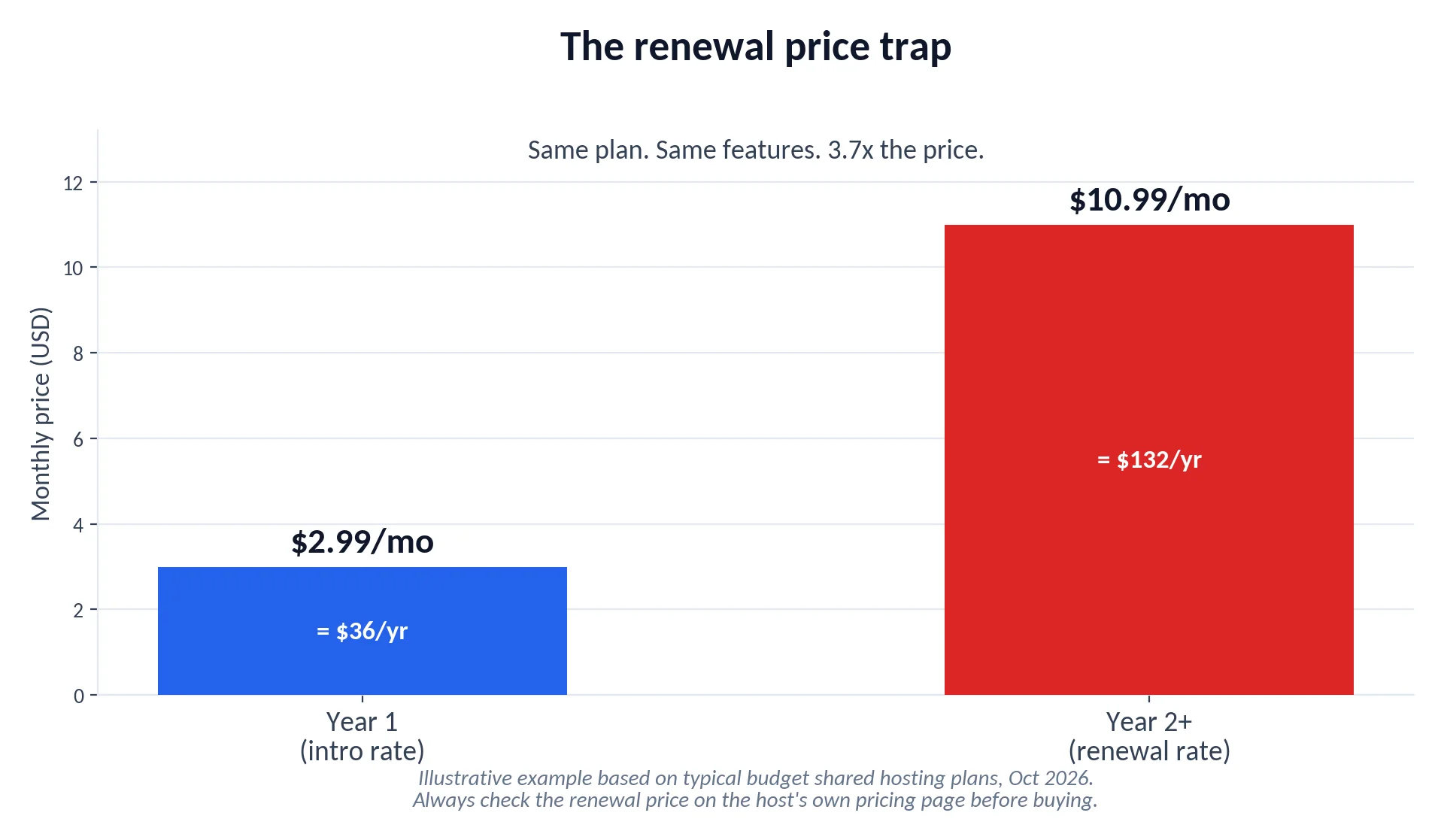
So a plan that cost you $36 for year one quietly bills you $130+ for year two. Multiply that across a few sites and the intro discount stops looking like a deal.
My rules:
- Always find the renewal price before checkout. If a host hides it, that tells you something.
- The longest intro term is only a deal if you’re confident you’ll stay.
- Compare hosts on 3-year total cost, not month-one price.
Every review on this blog will show the renewal price next to the intro price, in the same size font. It should be law.
Warning
Watch the checkout screen itself. Hosts love pre-ticked add-ons - site backups, “SEO tools,” premium SSL - adding $2-5/month each. Untick everything, then add back only what you understand.
4. Support you can reach at 2 AM
Your site will break at the worst possible time. They always do.
When it happens, the question isn’t whether the host has “24/7 support” - everyone claims that. It’s whether you get a human who can actually fix things, in minutes, on a channel you like.
A simple test worth copying: open a live chat with a real technical question before you commit (not “how do I install WordPress” - something like forcing a specific PHP version or debugging a 500 error) and note:
- How long until a human replies (under 2 minutes is good, over 15 is bad)
- Whether they fix it or paste a knowledge-base link
- Whether they try to upsell you mid-problem (it happens)
Phone support is nice, but honestly, good live chat beats a phone queue. Email/ticket-only support on a budget host is a red flag.
5. Ease of use: the dashboard you’ll actually live in
You’ll touch your hosting dashboard more than you think - installing WordPress, creating email addresses, restoring backups, adding SSL.
What good looks like in 2026:
- One-click WordPress install that actually takes one click
- Free SSL (Let’s Encrypt) that auto-renews without you touching it
- A staging site - a private copy of your site where you can break things safely. Once you’ve used staging, you can’t go back.
- A file manager and database access that don’t fight you
cPanel is the old standard and still fine. Several big hosts now use their own custom panels - some are genuinely better, some are just cheaper for them. This is one of the things screenshots tell you faster than any spec sheet, which is why reviews here will walk through the actual dashboard.
6. Room to grow (without a painful migration)
Nobody plans to outgrow their host. Then a post goes viral, or the store takes off, and suddenly the $3 plan is on fire.
Before you buy, check the ladder above the plan you’re choosing:
- Does this host sell VPS or cloud plans you can upgrade into in-place, or is growth a full manual migration?
- What do the higher tiers actually cost at renewal? (See rule 3.)
- Can they move you, and will they do it free?
Switching hosts is absolutely possible, but a clean upgrade path inside one host saves you a weekend. Shared hosting is the right start for 90% of new sites. Just make sure it’s not a dead end.
7. Backups and security basics
Last on the list because most decent hosts now cover it - but “most” isn’t all, and the details matter.
Non-negotiables:
- Free SSL certificate. Paid SSL for a basic site in 2026 is a junk fee.
- Automatic daily backups - and read whether restores are free. Some hosts back up daily but charge $25+ per restore. That’s a hostage situation.
- Malware scanning and a web application firewall. You’ll never notice them until the day they save you.
- Two-factor authentication on the hosting account itself.
One habit worth more than any host feature: keep your own backup copy off the server (a plugin sending weekly backups to Google Drive or Dropbox works fine). Hosts lose data. It happens.
Which type of hosting do you actually need?
Quick primer, because the marketing terms blur together:
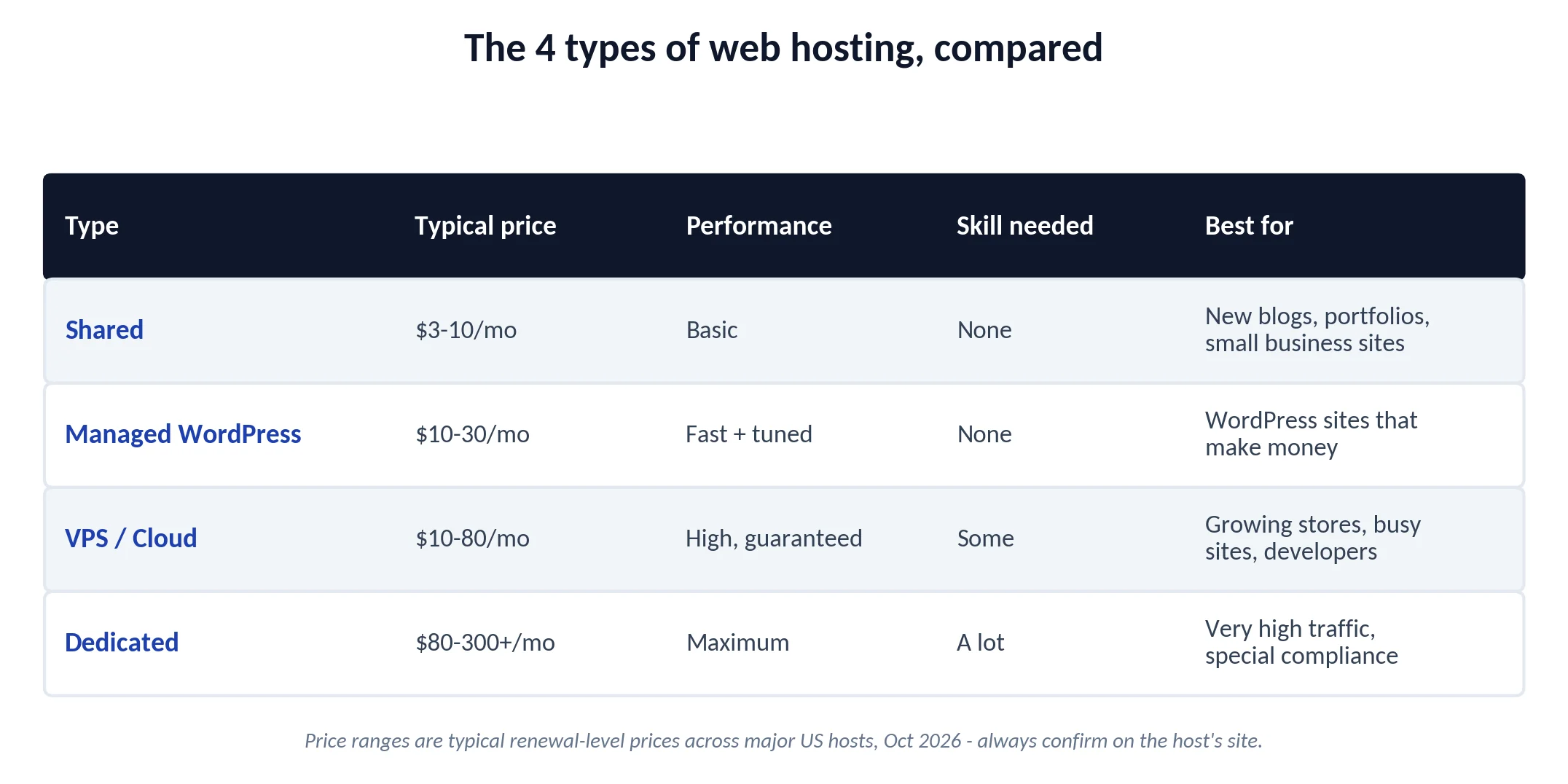
- Shared hosting - your site shares one server with hundreds of others. Slowest but cheapest. Right answer for new blogs, portfolios, and small business brochure sites.
- Managed WordPress hosting - shared/VPS with WordPress-specific tuning, updates, and support. Costs more, saves time. Worth it once a site makes money.
- VPS / cloud - your own slice of a server with guaranteed resources. For growing stores, busy sites, and developers who want control.
- Dedicated - a whole physical server. Almost nobody starting out needs this.
Still not sure? Walk this decision tree:
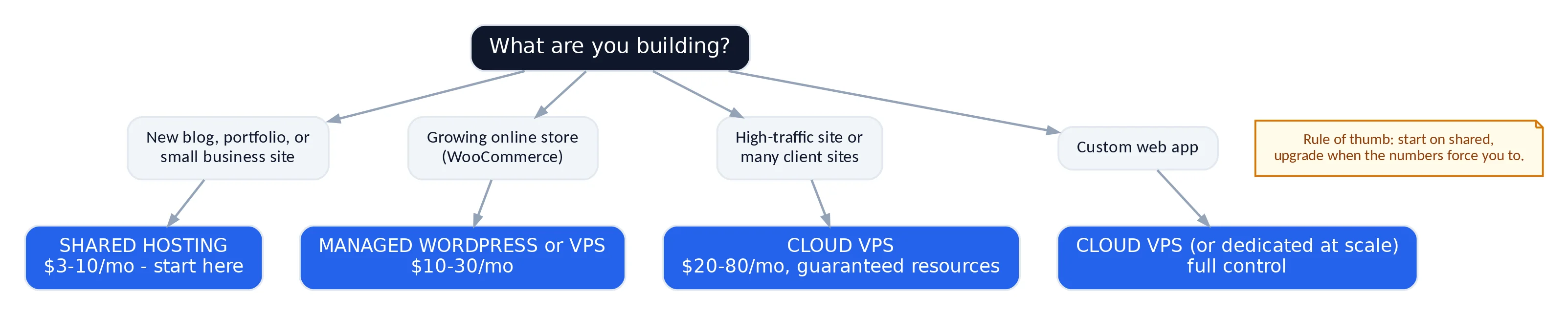
The short version: start on shared, upgrade when the numbers force you to. Starting cheap rarely hurts; paying for power you never use does.
Mistakes I see beginners make
These are the repeats worth avoiding:
- Buying the longest term for the biggest discount before they’ve spent a week with the host.
- Registering the domain and hosting in the same account without thinking. Convenient, but keep your domain registrar separate if you can - it makes leaving a bad host much easier.
- Paying for “SEO tools” and “site builders” that are free elsewhere.
- Judging by the intro price (see rule 3, again, forever).
- Never testing support until the site is down.
FAQ
How much should web hosting cost?
For a new site: $3-5/month on an intro deal, $8-12/month at renewal. If you're quoted more than that for basic shared hosting, keep shopping.
Is free web hosting worth it?
Two different things share the "free hosting" label. Classic free PHP/WordPress hosts come with tight resource caps, forced ads, and little support - fine for learning, limiting for anything serious. Free static hosting is a different story: services like Cloudflare Pages serve static sites free on fast infrastructure (this very site runs on it). If your site can be static - a blog, portfolio, or docs site - free static hosting is genuinely good. For WordPress or anything database-driven, budget paid hosting costs less than two coffees a month.
Can I switch hosts later without losing my site?
Yes. A proper migration moves your files and database, and done right there's no downtime. Many hosts will migrate one site free to win your business.
Do I need hosting specifically "for WordPress"?
No. Any decent host runs WordPress. "WordPress hosting" is often regular shared hosting with a label - read what you actually get. Managed WordPress plans are different: those genuinely add value if you'll use it.
What's the single most important thing on this list?
Renewal pricing and support, tied. Everything else is visible on day one; those two reveal themselves when it's too late to shop calmly.
The bottom line
Choosing hosting isn’t about finding the “best” host - it’s about matching a host’s honest specs to what your site actually needs today, with a clean path to tomorrow.
Run the seven checks: performance, uptime proof, renewal price, support quality, dashboard, upgrade path, and backups. Any host that passes all seven will treat you fine. Any host that hides one of them is telling you who they are.
The big names will go through exactly this checklist in upcoming reviews - starting with the hosts worth shortlisting for small business sites. That roundup is in the works.